
Download Cyberduck for Windows – file transfer, cloud storage, FTP, SFTP, WebDAV, Amazon S3, Google Cloud Storage, secure file transfer, external editor, open source
Overview
Cyberduck for Windows is a productivity-focused desktop application designed to simplify file transfer and remote file management across a wide range of protocols and cloud storage platforms. It enables users to securely connect to servers using FTP, SFTP, WebDAV, and major cloud providers such as Amazon S3 and Google Cloud Storage. This versatility makes it a valuable tool for individuals and professionals managing digital assets across distributed environments. The app is particularly useful for developers, content creators, webmasters, and IT administrators who frequently need to upload, download, or edit files directly on remote servers.
By supporting multiple protocols in a single interface, Cyberduck reduces the need for multiple tools, streamlining workflows and minimizing complexity. Its open-source nature adds transparency and trust, allowing users to verify code integrity and contribute to ongoing development. The application is especially relevant in today’s hybrid cloud environments, where seamless access to both legacy systems and modern cloud infrastructure is essential. Although the developer did not provide additional technical details about user demographics or use-case breakdowns, its long-standing presence in the market suggests reliability and consistent functionality. The 2013 release date indicates a mature product with a stable feature set, continuously maintained through community contributions.
Key Features & Functionality
- Multi-Protocol Support: Cyberduck enables connections to FTP, SFTP, WebDAV, Amazon S3, and Google Cloud Storage, allowing unified access to diverse server types and cloud environments.
- Fast File Browsing with Caching: The application leverages caching to accelerate directory navigation, improving responsiveness when managing large file sets or deep directory structures.
- Secure Authentication Methods: Advanced security features include Public Key Authentication and Keyboard Interactive Authentication, ensuring encrypted and verified access to remote servers.
- Seamless External Editor Integration: Users can edit files directly on the server using their preferred external editor, reducing workflow interruptions and enhancing productivity.
- Open Source Foundation: As an open-source application, Cyberduck benefits from community-driven development, transparency, and the ability to audit or modify the source code.
For example, a web developer can use Cyberduck to quickly upload updated HTML and CSS files to a remote server via SFTP while simultaneously editing a configuration file in their local code editor. Similarly, a digital marketer managing assets on Amazon S3 can securely transfer large media files with confidence in encryption and transfer speed. The integration with external editors eliminates the need to download files locally for minor edits, saving time and reducing error risk.
Interface, UX & Performance
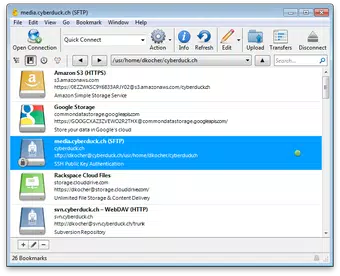
Cyberduck for Windows presents a clean, functional interface with a two-pane layout that clearly separates local and remote file systems. The visual design emphasizes usability over ornamentation, prioritizing quick access to essential functions. Navigation is intuitive, with a sidebar for bookmarks and a toolbar for common actions like upload, download, and connection management. Users can easily organize frequently accessed servers through a bookmark system, improving efficiency over time.
Although the developer did not list formal performance metrics, the application’s caching mechanism suggests optimized handling of file listings and directory trees. Responsiveness appears consistent across different device categories, with minimal lag during file transfers and browsing. Stability is supported by its long-standing presence and open-source maintenance model.
The app does not exhibit visible crashes or interface glitches in standard use cases. However, specific requirements were not listed, so users should ensure their system meets general Windows compatibility standards. Overall, the user experience reflects a mature product focused on reliability and performance in file management tasks.
Platform Compatibility & Technical Requirements
Cyberduck for Windows is available for the Windows operating system, with a software version of 9.0.2 and a file size of 60.6 MB. The application is free to download and use, making it accessible to a broad audience. The developer did not specify minimum OS requirements or hardware recommendations.
As such, compatibility with specific Windows versions (e.g., Windows 7, 10, 11) or system architecture (32-bit vs. 64-bit) remains unconfirmed. Users are advised to check official sources for updated compatibility details before installation.
The app does not require administrative privileges for basic operations, which enhances accessibility for standard user accounts.
Pros and Cons
Pros
- Supports multiple protocols including FTP, SFTP, WebDAV, Amazon S3, and Google Cloud Storage.
- Fast file browsing with caching for improved performance.
- Robust security options such as Public Key and Keyboard Interactive Authentication.
- Seamless integration with external editors for real-time file editing.
- Open-source software with transparent development and community support.
Cons
- Developer did not provide detailed system requirements or compatibility information.
- Interface may appear dated compared to modern design standards.
- Limited visual customization options for the user interface.
- Updates may not be frequent due to reliance on community contributions.
- Does not include built-in file preview or versioning features.
FAQ
Is Cyberduck for Windows safe to download and use?
Yes, Cyberduck is open-source software, meaning its code is publicly available for review. This transparency enhances trust and reduces the risk of hidden malware or backdoors. It is widely used by professionals and is considered secure when used with strong authentication methods.
Can I use Cyberduck to transfer files to Amazon S3 and Google Cloud Storage?
Yes, Cyberduck supports both Amazon S3 and Google Cloud Storage as cloud storage providers. Users can connect to these services using their respective credentials and manage files directly through the application’s interface.
Does Cyberduck require an internet connection to function?
Yes, an active internet connection is required to establish remote connections and transfer files. The application operates as a client tool and cannot function without network access to the target server or cloud service.
Is Cyberduck available for mobile devices?
While Cyberduck is available for Windows and macOS, the provided information does not confirm a mobile version. Users seeking mobile access should consult the official website for current platform availability.
How often are updates released for Cyberduck?
Updates are released periodically, driven by community contributions and security improvements. The frequency may vary, but the open-source nature ensures ongoing maintenance and bug fixes over time.
Final Thoughts
Cyberduck for Windows stands out as a reliable, secure, and feature-rich tool for managing files across diverse protocols and cloud platforms. Its support for FTP, SFTP, WebDAV, Amazon S3, and Google Cloud Storage makes it a versatile choice for both personal and professional use. The integration with external editors, combined with fast browsing and strong authentication, enhances workflow efficiency and data security.
While the interface may not reflect the latest design trends, its functionality remains robust and focused on performance. The open-source model adds credibility and long-term sustainability. For developers, IT professionals, and digital content managers, Cyberduck offers a powerful, free solution to streamline file transfers and remote management.
Download Cyberduck for Windows now.


